Two switches, one logical switch
Anyone who relies on redundancy in the access or aggregation layer is familiar with the problem: Two switches usually mean two management points, a Spanning Tree between them, and uplinks that must be painstakingly secured using routing protocols or VRRP/HSRP. Cisco StackWise Virtual (SVL) solves this by merging two physical chassis—usually from the Catalyst 9000 series—into a single logical switch. Externally, the pair appears as a single device with one IP address, one configuration, and one MAC address table. Internally, however, it remains a cluster of two independent hardware chassis that are kept in sync via dedicated links.
The basic principle: One of the two switches acts as the active switch, while the other acts as the standby switch. Only the active switch operates the entire control plane (routing protocols, STP, SNMP, CLI access). The data plane—that is, the actual forwarding of packets—runs in parallel on both chassis, since both have their own ASICs and forwarding tables, which are kept in sync via the internal connection.
It's worth taking a closer look here, because StackWise Virtual requires not just one, but typically two different types of links between the chassis.
The Connections in Detail
It's worth taking a closer look here, because StackWise Virtual requires not just one, but typically two different types of links between the chassis.
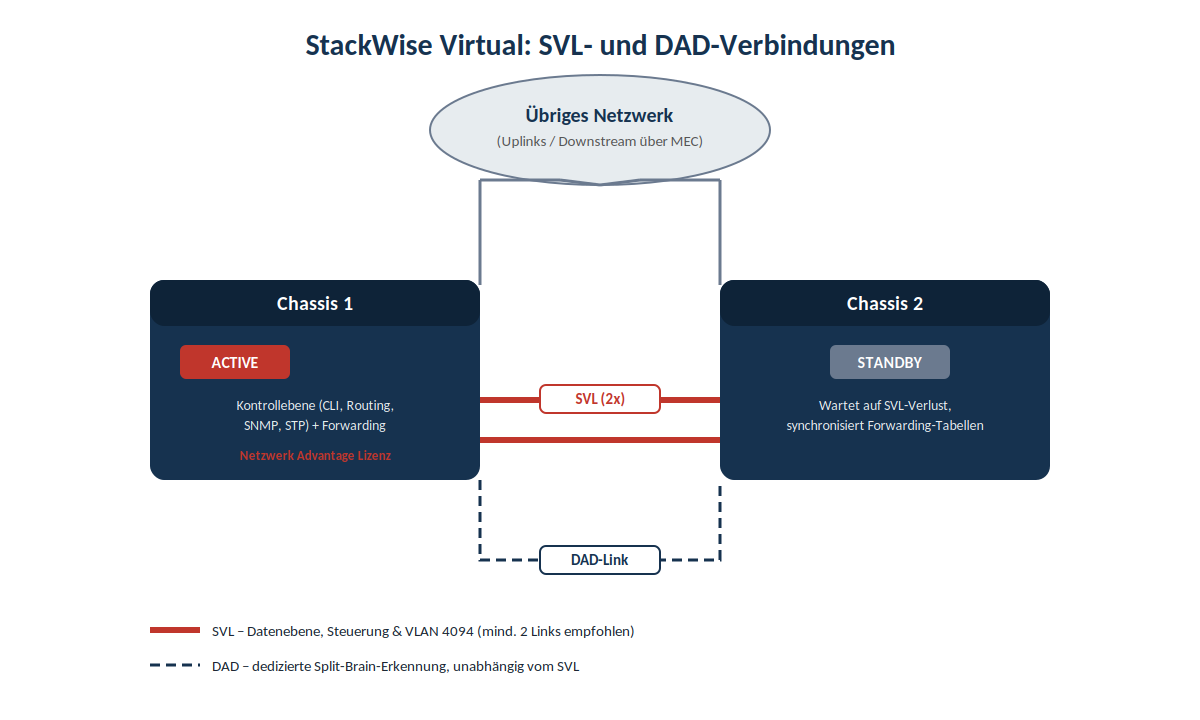
Fig. 1: SVL and DAD connections between the two chassis
The StackWise Virtual Link (SVL)
The SVL is the backbone of the solution. Three things happen simultaneously through it:
- internal control communication between the two chassis (status, configuration synchronization, heartbeats)
- Synchronizing the forwarding tables so that both chassis know how to forward packets
- Productive data traffic that must be routed between chassis, such as when a client on Chassis 1 wants to communicate with a server whose port is connected to Chassis 2
Technically speaking, an SVL can consist of multiple physical ports that are bundled into a single logical link. For redundancy reasons, Cisco recommends at least two physical connections on different modules or ASICs, so that a single hardware failure does not completely disable the SVL. There are a few fixed rules that often become pitfalls in practice more often than one might think: All ports used for an SVL must have the same speed—a mix of 10G and 40G ports in the same link is not permitted. Furthermore, only Cisco-proprietary transceiver modules are supported for SVL and Dual-Active-Detection links; third-party optics are not supported here.
Internally, StackWise Virtual also reserves a fixed VLAN ID for its own control communications: All inter-chassis system communications between stack members take place over the reserved VLAN ID 4094 from the global VLAN range, which is why this VLAN ID must not be used in the rest of the network. This is one of the classic mistakes made when migrating an existing network to SVL—if VLAN 4094 is already in use elsewhere, it will conflict with the internal control plane.
The Dual Active Detection Link (DAD)
The second, often underestimated component is the DAD link. It is intentionally designed separately from the SVL and has only one function: to detect whether a so-called “split-brain” situation has occurred—that is, a state in which both chassis believe they are the active one.
Why is this even possible? If the standby switch detects a complete failure of the SVL, it assumes that the active switch has failed and assumes the active role itself. However, if the original active switch is still operational, both switches are active at the same time. The problem with this is that both switches then use the same IP addresses, SSH keys, and STP bridge IDs, which can cause significant instability in the network.
That is exactly why the DAD link exists as an independent, additional communication path—it does not run over the same hardware as the SVL, so that a total SVL failure does not automatically cripple split-brain detection as well. It can be implemented either as a direct point-to-point connection between the two chassis or via a third device (Fast-Hello mechanism). In practice, a 1G port is often sufficient in terms of bandwidth, since only small Hello packets are exchanged—but how quickly the split-brain detection is supposed to react determines how this link is sized.
If the system actually detects a dual-active state, a clearly defined mechanism is triggered: The active switch that detects the dual-active situation shuts down all of its non-SVL and non-DAD interfaces to remove itself from the network, and then waits in recovery mode until the SVL is restored. Only after the SVL connection has been physically repaired does the affected switch automatically reboot and rejoin the network as a standby.
Can you turn off a switch while it's running?
That is the question that makes StackWise Virtual so appealing in practice—and the answer varies depending on whether it is a planned maintenance or an unplanned outage.
Unplanned Outage: If the active switch fails unexpectedly (power outage, hardware failure), the standby switch automatically assumes the active role. Since both chassis continuously keep their forwarding tables synchronized, this transition is very fast from a data-layer perspective—the new active switch no longer has to go through a complete network convergence, as would be the case with two independent switches using STP or routing protocols. Important for practical implementation: Downstream devices should be connected to both chassis via Multichassis EtherChannel (MEC). Only then will their uplinks remain active in the event of a chassis failure, because the EtherChannel simply continues to operate using the remaining links instead of having to converge anew.
Scheduled maintenance, such as a software update: This is where In-Service Software Upgrade (ISSU) comes into play. ISSU is supported on all Catalyst 3850 and Catalyst 9000 switches that support StackWise Virtual, as well as on standalone Catalyst 9400/9600 chassis with dual supervisors. The process: First, only the standby switch is rebooted with the new software version, while the active switch continues to handle all network traffic. Once the standby switch is back online and synchronized, a controlled switchover is triggered—the previous standby switch assumes the active role, and the former active switch then reboots itself and adopts the new software. In the end, both chassis are running the same version without any continuous interruption for connected clients. An important detail here: ISSU only works if both switches are booted in Install mode—the process is denied in Bundle mode. This is one of the most common reasons why a planned ISSU fails in practice before it even begins.
Even without ISSU, one of the two switches can be selectively taken out of service—for example, to replace hardware: A manual reload or shutting down the standby chassis does not interrupt operation, because the active switch handles the entire control plane anyway and maintains full connectivity to the connected devices via MEC. If, on the other hand, the active chassis is shut down, the standby chassis takes over—functionally identical to the unplanned failover scenario described above, only deliberately initiated.
Pitfalls to Avoid
As described above, the two switches are closely interlinked via SVL and DAD. Important to know: These connections should never be disconnected without proper oversight. If both types of links are disconnected simultaneously, one of the switches—or even both—may enter recovery mode, causing all switch ports to shut down. The result is not a smooth failover, but a total failure.
If the physical connection between the two chassis must ever be completely disconnected—for example, because one of the switches is to be serviced or moved to another location—there is a clear procedure to follow: The affected switch must first be completely powered down—only then may the cables be disconnected; never the other way around.
Before performing such a procedure, it’s worth checking the current status of the system to ensure that both chassis are synchronized and to determine what role each is currently playing:
- show stackwise-virtual – displays whether StackWise Virtual is enabled, as well as the domain number and the assigned ports.
- show switch – displays the roles (Active and Standby) of both physical chassis in the cluster.
- show stackwise-virtual link – displays details and status of the SVL.
- show stackwise-virtual dual-active-detection – displays information about the detection of an activated dual-active state.
A Word About the Design's Fault Tolerance
What sets StackWise Virtual apart from a traditional solution with two independent switches and a first-hop redundancy protocol is the speed and smoothness of the transition: There is no STP reconvergence process, no ARP rediscovery, and no redistribution of HSRP priorities—from the perspective of the rest of the network, it remains the same logical switch the entire time. The trade-off is complexity elsewhere: SVL and DAD must be carefully planned, sized, and cabled separately, and an error in VLAN 4094 reservation or transceiver selection is often not noticed until it’s already too late.
References:
https://www.cisco.com/c/en/us/td/docs/switches/lan/catalyst9500/software/release/17-17/configuration_guide/ha/b_1717_ha_9500_cg/configuring_cisco_stackwise_virtual.html
https://www.cisco.com/c/en/us/td/docs/switches/lan/catalyst9500/software/release/17-9/configuration_guide/ha/b_179_ha_9500_cg/configuring_cisco_stackwise_virtual.html
https://www.cisco.com/c/en/us/td/docs/switches/lan/catalyst9500/software/release/17-15/configuration_guide/ha/b_1715_ha_9500_cg/configuring_cisco_stackwise_virtual.html
https://www.cisco.com/c/en/us/td/docs/switches/lan/catalyst9400/software/release/17-8/configuration_guide/ha/b_178_ha_9400_cg/configuring_cisco_stackwise_virtual.html
https://www.cisco.com/c/en/us/td/docs/switches/lan/catalyst9600/software/release/17-15/configuration_guide/ha/b_1715_ha_9600_cg/configuring_cisco_stackwise_virtual.html
https://www.cisco.com/c/en/us/td/docs/switches/lan/c9000/ha/c9610/svl-configuration-guide/configuring_cisco_stackwise_virtual.html
https://www.cisco.com/c/en/us/support/docs/switches/catalyst-9500-series-switches/214406-in-service-software-upgrade-issu-on-ca.html
https://community.cisco.com/t5/switching/catalyst-9500-dad/td-p/4786426
https://community.cisco.com/t5/switching/9500-stackwise-virtual-reload-issue/m-p/4089424
Leave a Reply