What exactly is DHCP?
According to Wikipedia, the Dynamic Host Configuration Protocol (DHCP) is described as a communication protocol in computer technology.
It allows a DHCP server to assign network configurations—primarily the IP address, subnet mask, gateway address, and one or more DNS servers—to clients.
DHCP wurde im RFC 2131 definiert und bekam von der Internet Assigned Numbers Authority (IANA) die UDP-Ports 67 und 68 zugewiesen.
In short, when a device is connected to a network, it is assigned an IP address and the other necessary information to communicate with other devices on the network or the Internet.
Each device requires its own IP address, which may be used only once within this range.
Thus, a DHPC service offers advantages over manually assigning this information to all devices on the network:
Duplicate IP address assignments are prevented, and the stations receive all the necessary information.
However, using a DHCP service can also raise security concerns:
Additional DHCP servers that have been added to a network—whether by mistake or on purpose—can cause serious network problems or even redirect devices and data without the user even realizing it.
But that's not what this is about.
So how does the network client obtain the information it needs to communicate with other devices or services on the network?
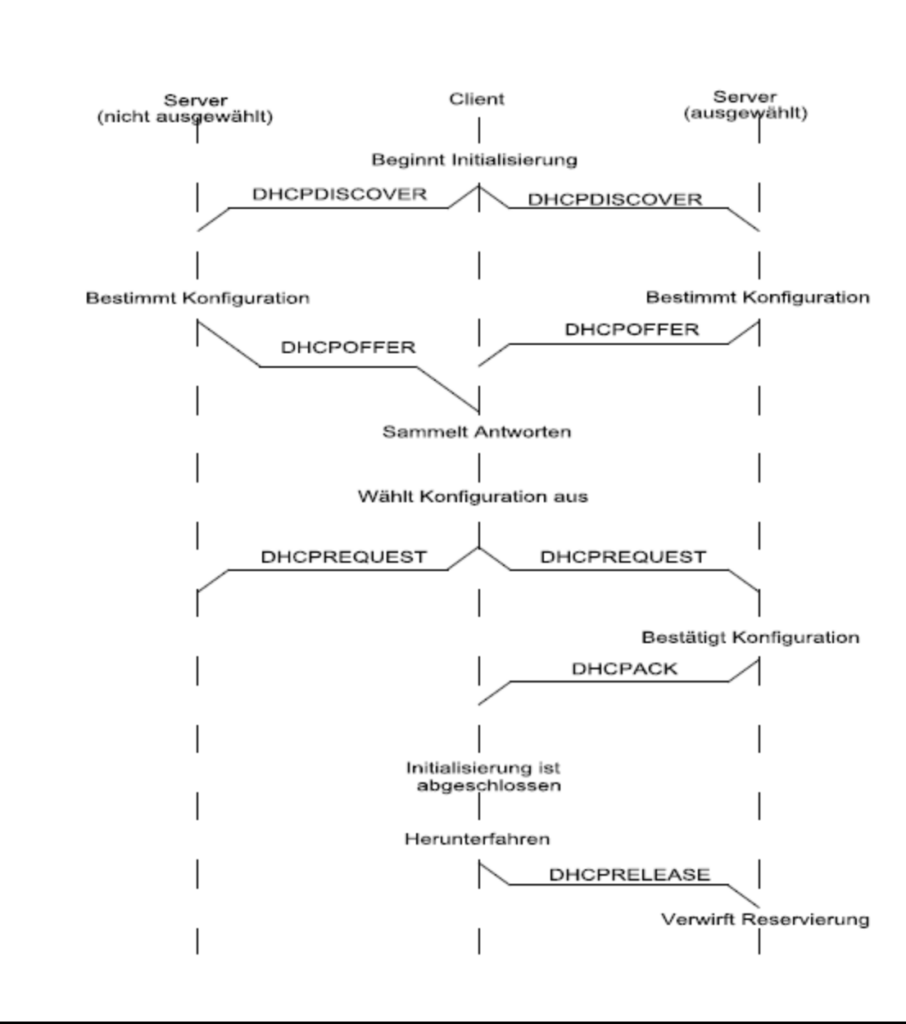
A client that is connected to a network and needs an IP address first sends a broadcast—a DHCPDISCOVER message—to all DHCP servers that can receive it
In this case, the UDP source port is 68 and the UDP destination port is 67.
The DHCP servers respond with a DHCPOFFER and propose an IP address. This is done either via a broadcast to the address 255.255.255.255 with UDP source port 67 and UDP destination port 68, or via a unicast to the proposed IP address and the client's MAC address.
DHCP Optionen
In addition to the information mentioned so far, additional parameters can be provided for the clients.
There are clearly defined additional options, such as:
Option 1 the subnet mask, or
Option 3 The router being used.
A complete list of these can be found, for example, at the IANA (Internet Assigned Numbers Authority).
In this article, I will focus on options 43 and 60.
DHCP Option 43 is vendor-specific, meaning it is designed specifically for manufacturers. This gives manufacturers the ability to obtain their own values and data from this option. That's a great feature, but unfortunately, there's a catch.
Since this option is available to all manufacturers, there are, on the one hand, no clear guidelines or definitions regarding what information should be entered and in what format; each manufacturer can manage this on its own. On the other hand, it creates additional problems when the manufacturers of the DHCP server and DHCP client are different, because the way a DHCP server transmits the data and the way the client requires it can also vary (values in string, binary code, or hexadecimal).
Option 60
Using optional values (in string format), the DHCP server can send additional information only to specific clients. Instead of sending the information from Option 43 to all clients on this subnet, it can be sent only to those clients that are identified as matching based on the definition (string value from Option 60).
In its DHCP request (DHCP discovery message), the client includes its client information, which the DHCP server can verify.
An example of this would be a Cisco access point from a specific model series:
Cisco AP C9120AX
I decided to take a closer look at the DHCP options because, like many others, I ran into the problem that newly added access points weren't connecting to the Wi-Fi controller on their own.
Depending on the manufacturer, there are different methods a new Wi-Fi access point uses to search for a potential WLC.
Using Cisco as an example, there are three ways to get a newly unboxed or reset access point to search for a WLC.
- The Cisco access point receives the IP address of the Wireless Lan Controller via DHCP option 43 and can communicate directly with the assigned IP address.
This usually works best within the same network segment or within a VLAN (Layer 2).
- If no information is sent from the DHCP server, the AP attempts to resolve the FQDN.
- CISCO-LWAPP-CONTROLLER.localdomain or
- Resolve “CISCO-CAPWAP-CONTROLLER.localdomain” on the DNS server to obtain a corresponding IP address from it. (Usually Layer 3, depending on the infrastructure architecture)
- If that doesn't work either, the only option left is to manually enter the WLC(s) in the access point configuration. This can be done via the CLI (Command Line Interface) using the console port.
In my case, the DNS server's name resolution unfortunately did not return a matching entry; this can be due to a variety of reasons.
Not every network offers the option of personally managing such servers and services. Therefore, the DHCP server was my first choice.
Now it was time to get down to business. First, I had to figure out in what format the Cisco access point (DHCP client) required the values from DHCP option 43, and second, how the DHCP server needed to format the entries so that the Cisco AP could understand them.
As mentioned earlier, there are no standardized formats or implementation processes for Option 43. A Windows DHCP server will handle this differently than Manufacturer A or B, whose firewalls include a DHCP server function.
The Structure of a DHCP Option 43
Suboption | Number of subsequent values | Vendor-specific information
| 241 | 04 | 192 | 168 | 1 | 10 |
One requires entries in binary form, but separated by semicolons:
241;04;192;168;1;510
For AireOS access points, the following is more commonly used:
WLC IP Address 192.168.1.10 – Management IP
DHCP Option 43:
0xf104.c0a8.010a
The value 0xf1 = 241
Another one uses hex values in the following format:
f1040a01010a
Or a hybrid of the two:
f1;04;0a;01;01;0a
DHCP server on a Cisco device:
Internal DHCP pool in Cisco router or switch can use as follows:
ip dhcp pool VLAN20
network 172.168.10.0 255.255.255.0
default-router 172.168.10.1
dns-server 83.68.72.2
option 43 hex f104aca80a02 <= 04-indicates one controller/aca80a02-“controller ip:172.168.10.2 in hexadecimal”
option 60 ascii “Cisco AP c3700”
DHCP server entries for a Windows server:
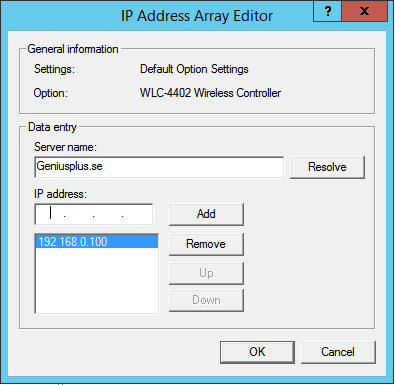
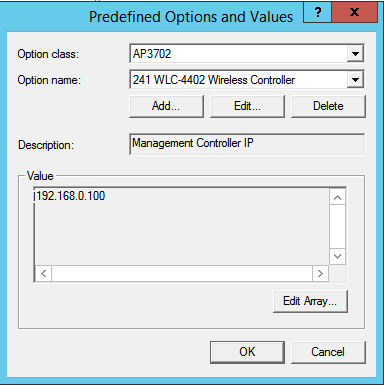
If everything worked out, you'll be able to see that via the console access on the Cisco access point:

My Conclusion
All entries in DHCP server option 43 remain undefined, as this leaves manufacturers free to decide what additional information they want to provide to the DHCP client.
However, the different implementation methods used by various manufacturers complicate matters, and you'll have to test them on a case-by-case basis. Even within a single manufacturer, the approach can vary between different software versions.
Since Cisco switched from AireOS to IOS XE in the Wi-Fi sector a few years ago, the procedures for Option 43 have also changed.
The manufacturers' documentation is the first place to start. If two different manufacturers are used for the DHCP server and the DHCP client, this can complicate the communication process.
In my last case, it was a SonicWall acting as the DHCP server and Cisco access points (IOS XE) acting as DHCP clients.
The following entry ultimately led to success:
241,04,192,168,1,10
The decimal number 241 is the HEX value: F1 or f1 (0xf1)
The 04 indicates that 4 bytes follow (the IP address follows)
In this case, the IP address is displayed as a decimal number separated by commas.
If you want to specify more than one WLC, the second value changes from 04 to 08, and to 12 if there are three:
241,08,192,168,1,10,192,168,1,11
Once you understand the basic principle behind DHCP options, it's easy to test the different possibilities.
Manufacturers use different sub-options:
Cisco = 241
Ubiquiti = 1 oder 3
Extreme = 1
etc. In such cases, an online search or the manufacturer's specifications usually provide the answer.
References:
https://www.cisco.com/c/de_de/support/docs/wireless/catalyst-9120axe-access-point/221056-understand-the-ap-join-process-with-the.html
https://community.cisco.com/t5/wireless-mobility-knowledge-base/vendor-class-identifier-dhcp-option-43-option-60-and-option-241/ta-p/5134724
https://www.iana.org/assignments/bootp-dhcp-parameters/bootp-dhcp-parameters.xhtml#options
https://www.rfc-editor.org/rfc/rfc2132.txt
https://de.wikipedia.org/wiki/Dynamic_Host_Configuration_Protocol
Leave a Reply